
What a statement of hours shows
A statement of hours covers one period and shows hours only, never money. Your client sees the same statement in the email, on the page the View statement button opens, in their portal and in the CSV. Hours are written as decimals: 1.50 h is an hour and a half.
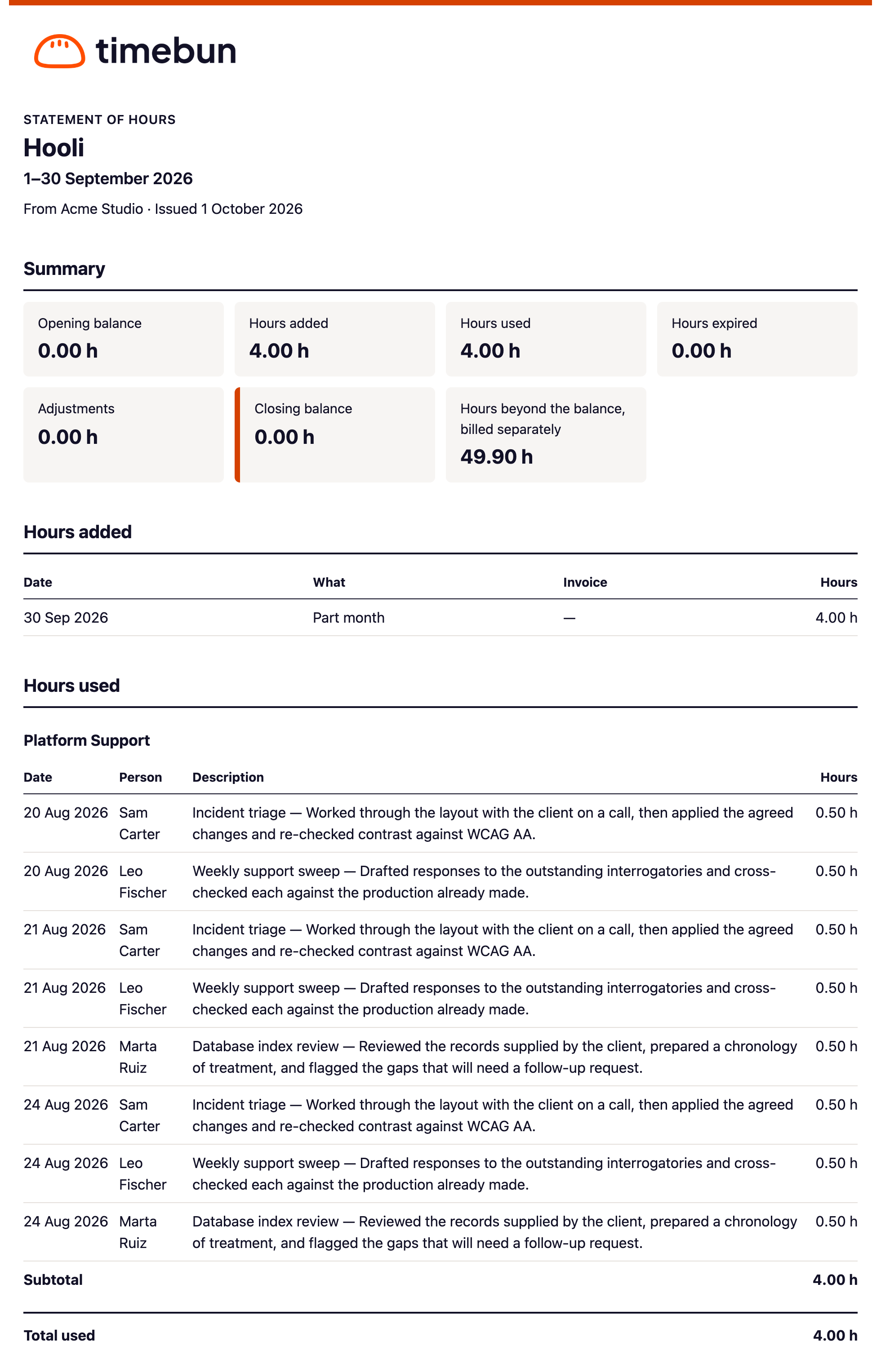
Summary
- Opening balance — the hours left at the start of the period. It's always the previous statement's Closing balance, so statements follow on from each other.
- Hours added — plan renewals, bundles bought, and hours you added by hand.
- Hours used — time drawn from the balance.
- Hours expired — hours that lapsed unused.
- Adjustments — hand corrections, and changes to periods already reported (see below).
- Closing balance — the hours left at the end of the period.
- Hours beyond the balance, billed separately — work that ran past the hours left.
- Hours billed directly, separately from the balance — only shown when there are some.
A client with two or more retainers also gets Balance by retainer: the same figures for each retainer, plus a row for Hours not tied to a retainer when there are any.
The detail
Each section only appears when it has something in it.
- Hours added — date, what it was (for example the plan renewal, the bundle's name or the Note you typed when you clicked Add hours) and the invoice number when the hours were paid for on an invoice.
- Hours used — grouped by project, each with its date, person, description and hours, a Subtotal per project and Total used. Time with no project is under No project. The hours are the billed hours, after any write-down, because that's what came off the balance. See Billed hours and write-downs.
- Hours beyond the balance — each entry that ran past the hours left, marked Billed on invoice and its number, or Not yet invoiced. See How balances work.
- Hours billed directly — work on projects set to Billed directly, with the invoice that bills it. It doesn't change the balance.
- Hours expired — the date and the hours that lapsed.
- Adjustments — each change you made with Adjust this balance, described by its Note.
- Adjustments to earlier periods — see below.
The CSV has one row per line with Section, Date, Project, Person, Description, Hours, Invoice and Note.
What's left out, and what isn't
- Non-billable time never appears.
- Billable time on a retainer client is itemised even when it has no project or its project is hidden from the client's portal. A statement accounts for every hour taken from the balance. See What clients can see.
- The notes you type when adding or adjusting hours are shown to the client as written.
Changes after a statement is sent
A statement never changes once it's issued. If you later edit, write down, move or delete an entry from a period that's already been reported, or log time there late, the difference goes on the next statement under Adjustments to earlier periods, with a Note such as Deleted, Not on an earlier statement, Now dated outside that period, Now drawn from the balance or Was 2.00 h, now 1.50 h.
Time is dated by the day it was worked, but never earlier than the hours it was taken from. An entry for 30 September logged on 1 October and paid for from October's hours appears on October's statement with its own date.